
Complete Step-by-Step Guide

Do you want to self-publish a book but don’t know where to start? It’s never been more accessible. Whether you’re a first-time author or an experienced writer, learning how to self-publish a book in 2026 gives you full control over your work, your profits, and your readers.
This guide walks you through every step of the self-publishing journey, from manuscript to finished hard-copy book on sale.
Self Publishing Guide Presentation
What Does It Mean to Self-Publish a Book?
Self-publishing means you, the author, handle the entire publishing process instead of signing a contract with a traditional publisher. You maintain creative control, own your work, and keep the profits from every sale. Get Professional Help (Optional But Recommended)
Self-publishing can feel overwhelming. That’s where we come in Worldy-TCP Plubishing Services
How Worldy-TCP Can Help You
Self-publishing can feel overwhelming. That’s where we come in.
Professional Formatting & Cover Design
We handle the work that makes your book look professional:
- Manuscript formatting for print-ready quality
- Professional cover design that increases sales
- ISBN setup and publishing guidance
- Quality assurance before your book goes live
These services ensure your hardcopy book looks professional and competes with traditionally published books.
Complete Publishing Support
We guide you through:
- Manuscript preparation and editing coordination
- Cover design and branding
- Formatting for print
- POD platform selection and setup
- Your own online shop implementation
- Initial marketing strategy
You’re never alone in the process. We handle the technical complexity while you focus on writing great books.
Get Started With a Free Consultation
Not sure where to start? Book a free consultation with our team.
We’ll discuss:
- Your book and target audience
- Which services you need
- Timeline and costs
- Your publishing goals
Book Your Free Consultation
Self-Publishing vs Traditional Publishing
Traditional Publishing:
- Publisher handles editing, design, printing, distribution
- You receive an advance (sometimes)
- Publisher keeps most of the profit
- Process takes 1-2 years
- Limited creative control
-
Hard to get accepted (competitive)
Self-Publishing:
- You handle (or hire help for) all steps
- No advance, but higher profit per book (40-60% vs 10%)
- You control everything: design, price, launch timing
- Can publish in weeks, not years
- Complete creative freedom
- Anyone can publish
Why More Authors Choose Self-Publishing Today
Self-publishing is growing rapidly because:
- Speed: Publish within weeks instead of waiting 2 years
- Control: You decide the cover, price, marketing strategy
- Profit: Keep 40-60% per book instead of 10%
- Audience leverage: If you have a YouTube channel, podcast, or social media following, you can sell directly to them without Amazon’s middleman
- No gatekeepers: No rejection letters from agents or publishers
- Direct reader relationships: Build your email list and stay connected with customers
Step 1: Write & Edit Your Book
Before you can publish, you need a finished manuscript. This is where most authors struggle—and where quality makes the biggest difference.
Get Your Manuscript Ready to Self-Publish
Your manuscript should be:
- Complete: Don’t start publishing before you’re done writing
- Self-edited: Read through it yourself, fix obvious errors
- Organized: Clear chapters, logical flow, professional structure
Pro tip: Many authors find it helpful to let their manuscript sit for 2-4 weeks after finishing, then re-read it with fresh eyes. You’ll catch errors and awkward phrasing you missed before.
Professional Editing (DIY vs Hiring)
You have two options:
DIY Editing:
- Use tools like Grammarly, Hemingway Editor
- Ask friends or beta readers for feedback
- Cost: $0-100
- Best for: Authors on tight budgets
- Risk: You might miss professional issues
Professional Editor:
- Hire a developmental editor (structure and content) or copy editor (grammar and style)
- Cost: $500-2,000+ (depending on book length)
- Best for: Authors serious about quality
- Benefit: Professional polish increases credibility and sales.
- Risks: Your style maybe affected, is important to identify yourself with the edited version.
Step 2: Design Your Professional Book Cover
Your book cover is your first impression. Studies show readers judge books by their covers in less than 2 seconds. A professional cover dramatically increases sales.
DIY Cover Design Tools
If you have design skills or want to try:
- Canva Pro: Easy templates, $120/year
- Book Brush: Specifically for book covers, templates included
- Adobe InDesign: Professional but steep learning curve
Cost: $0-50 one-time Best for: Authors with design experience or very tight budgets
Hire a Professional Cover Designer
A professional designer will:
- Create a custom cover matching your book’s genre and audience
- Design front cover, back cover, and spine
- Deliver print-ready files
- Often provide multiple concepts to choose from
Cost: $200-1,000 Best for: Authors serious about sales Benefit: Professional covers sell significantly more books
A $500 professional cover can increase your book sales by 200-400%. It’s one of the best investments you will make.
Step 3: Format Your Manuscript for Print
Formatting is the invisible work that makes your book look professional when printed. Poor formatting screams “self-published amateur.” Good formatting goes unnoticed—because it’s done right.
Manuscript Formatting Essentials
Your manuscript needs:
- Consistent font (professional serif or sans-serif, 10-12pt)
- Proper spacing between paragraphs and sections
- Page numbers on every page
- Running headers with book title or chapter names
- Proper margins (usually 0.75-1 inch on all sides)
- Chapter breaks with consistent formatting
- Clean TOC (table of contents) if needed
A poorly formatted manuscript looks unprofessional. Readers notice. It reflects on your credibility as an author.
Getting Professional Formatting Help
If formatting isn’t your strength (and it isn’t for most authors):
DIY Formatting:
- Use Microsoft Word templates or Canva
- Learn from YouTube tutorials
- Cost: $0-50
- Risk: Easy to miss professional standards
Professional Formatting:
- Expert handles all technical formatting
- Delivers print-ready PDF file
- Cost: $150-500
- Best for: Authors who want polished results
A professional formatting ensures your book looks as good printed as it does on screen.
Step 4: Set Up Your Publishing Channels
This is where smart authors in 2026 think differently. Instead of funneling everything through Amazon, successful self-published authors sell directly to their audience.
Why Your Own Online Shop is Better
Traditional approach: Self-publish on Amazon, hope readers find you in their massive catalog
Smart approach: Sell directly through your own online shop
Benefits of selling your own hard-copy books:
- You keep the customer relationship (not Amazon)
- Higher profit margin (you keep 50-70% instead of Amazon’s 30%)
- Build your email list (customers become repeat buyers)
- Control the customer experience (no algorithm deciding visibility)
- No middleman taking a cut
If you have an existing audience—YouTube channel, podcast, social media followers, email list—your own shop is significantly better than Amazon. Your audience already trusts you. Why send them to Amazon?
Print-on-Demand Platforms (The Infrastructure)
POD platforms are the printing infrastructure behind the scenes.
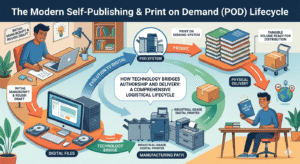
They:
- Print books when customers order (no inventory risk)
- Handle shipping
- Manage quality control
Common POD providers:
- IngramSpark (professional, good for bookstores too)
- Amazon KDP Print (simple, but Amazon handles the relationship)
- Local print shops (for larger orders)
Here’s the key: Your customers never need to know about the POD platform. They order from your shop, you fulfill through the POD service. They get their book. Everyone’s happy.
Leverage Your Existing Audience
If you have:
- A YouTube channel with subscribers
- A podcast with listeners
- An Instagram or TikTok following
- An email list
- A blog with regular readers
You do not need Amazon (but you can opt in parallel to your online shop). Sell directly to them through your own shop.
Example: A YouTuber with 50,000 subscribers can announce a new book to their audience and sell 500-1,000 copies directly, keeping 60% profit per book. Amazon wouldn’t give them this advantage—the algorithm would bury them in millions of other books.
Step 5: Publish Your Hardcopy Book
Once your manuscript is written, edited, designed, and formatted, it’s time to actually publish.
Upload Your Files
You’ll need:
- Print-ready PDF (from your formatter or design software)
- Front matter (title page, copyright page, table of contents)
- Cover file (front, back, spine as one file)
- Metadata (book title, author name, description, keywords)
Upload to your POD platform (or your shop’s integration with a POD service).
Set Your Price
Pricing depends on:
- Book length: Longer books cost more to print
- Paper quality: Better paper = higher cost
- Market: What do similar books sell for?
- Profit margin: What do you need to earn per book?
Typical hard-copy pricing:
- 200-page paperback: $12-18 retail
- 200-page hardcover: $18-28 retail
- Children’s books: $15-25
Your cost per book depends on the POD provider. Most charge $3-8 per copy to print. Price so you make $4-10 profit per book.
Review Before Publishing
Before you hit publish:
- Order a proof copy (test print of your book)
- Read through it (check for formatting issues, typos, print quality)
- Check the cover (colors, alignment, text clarity)
- Feel the paper (is the quality what you want?)
Never publish without reviewing a physical proof first. There’s always something you’ll catch when you see the printed version.
Step 6: How to Market Your Self-Published Book
Publishing is only half the battle. Marketing gets your book into readers’ hands.
Build an Author Platform
An author platform is your audience—people who know you and trust you enough to buy your work.
Start with:
- Website or blog (about you and your work)
- Email list (collect emails, send updates)
- Social media presence (be where your audience is)
- Author bio (professional, compelling, on every platform)
The bigger your platform, the more books you’ll sell. Focus here.
Use Social Media
Different platforms work for different books:
- YouTube: Perfect for educational, how-to, or story-driven books
- Instagram: Visual books, art, photography, memoir, lifestyle
- TikTok: Books for younger audiences, quick tips, storytelling
- LinkedIn: Business, leadership, professional development books
- Facebook Groups: Niche communities where your audience gathers
Don’t be everywhere. Pick 1-2 platforms where your audience actually spends time.
Email Marketing for Authors
Email is the highest ROI marketing channel for books:
- Send launch announcements to your list
- Share excerpts and behind-the-scenes content
- Offer pre-orders or early discounts
- Stay in touch with readers (they buy more books)
- Build a community around your work
Every person who buys your book should be invited to join your email list. These become your best repeat customers.
Common Mistakes When Self-Publishing a Book
Learn from other authors’ mistakes:
- Publishing before it’s ready: Don’t rush. A finished, edited, professionally formatted book sells better than a quick publication.
- Skipping professional editing: Typos and errors hurt credibility and sales.
- Cutting corners on cover design: Your cover is your marketing. Don’t cheap out here.
- Poor formatting: Readers notice. It makes your book look amateur.
- No marketing plan: If nobody knows about your book, nobody buys it. Market before, during, and after launch.
- ISBN should be considered, and metadata is very important: These technical details affect discoverability. Do them right.
- Trying to do everything yourself: Your time is valuable. Hire professionals for design, editing, formatting. Focus on writing great books.
- Relying only on Amazon: Build your own audience and sell directly. It’s more profitable.
Your Journey to Self-Publish a Book Starts Here
The decision to self-publish a book in 2026 is achievable, profitable, and within your control. You don’t need a publisher to validate your work. Your readers will.
The steps are clear:
- Write and edit
- Design a professional cover
- Format properly
- Set up your publishing channels
- Publish a quality book
- Market to your audience
The question isn’t whether you can self-publish.
The question is: Are you ready to share your book with the world?
If you want professional support to make the process smoother—handling formatting, design, and shop setup—we’re here to help.
Get started with Worldy-TCP today or explore our publishing services.
Ready to Publish Your Book?
Self-publishing is a journey, not a sprint. Take your time, do it right, and your hard-copy book will find its audience.
Questions about the process?
Drop them in the comments below, or reach out to our team for personalized guidance.
Happy publishing! 📚
Last updated: March 2026